

How to Track Conversions Without Third-Party Cookies


Introduction:
Businesses will have to collect already-available first-party data, use server-side tagging, utilize Google’s Consent Mode, and use other platform-based APIs to effectively track conversions without using third-party cookies. With both Safari and Firefox blocking all third-party cookie tracking, and with Chrome’s Privacy Sandbox still evolving, the only way for any business to report and track conversions accurately in 2026 will be to own their data infrastructure.
For all Google Ads, Facebook Ads, and other paid business campaigns that are run right now in Salem, Oregon, the ability to track conversions is crucial in order to accurately attribute success for the investment. The use of THOSE third-party cookies (for years) has facilitated the automatic tracking of all (four) conversion paths following the click of a visitor on an ad until the visitor completed a conversion (on the advertiser’s website). However, with the progression towards a cookie-less world, this effectiveness and ease of use are no longer present; i.e. the conversion tracking method that employs third-party cookies is breaking down; therefore, businesses are not adequately prepared.
Since 2017, Safari has prevented third-party cookies from being used for tracking on its platform. Firefox has also begun to do this since 2018. Brave blocks third-party cookies by default. Chrome currently has the largest market share of all the browsers and is in the process of implementing restrictions through their Privacy Sandbox. If you do not change how you track conversions immediately, your campaign data will continue to become less reliable and therefore make it difficult to make good decisions with your ad spending going forward, each month, more than before.
Why Third-Party Cookies Are Disappearing
According to the stats, between 40%-60% (depending on the actual browser type) of web sessions have already been affected because they are blocking these types of cookies. As a result of blocking cookies, Safari has been blocking cookies since 2017, but Chrome is progressively implementing restrictions through its Privacy Sandbox. Currently, the main browsers and their associated percentages of overall web traffic are as follows:
| Browser | Third-Party Cookie Status | Approx. Share of Web Traffic |
| Safari (Apple) | Fully blocked since 2017 (Intelligent Tracking Prevention) | ~18–20% |
| Firefox (Mozilla) | Blocked by default since 2018 (Enhanced Tracking Protection) | ~3–5% |
| Brave | Always blocked by default | ~2–3% |
| Chrome (Google) | Privacy Sandbox active — phased restrictions ongoing | ~65% |
| Edge (Microsoft) | Following Chrome’s Privacy Sandbox approach | ~5% |
In practical terms, if you only track conversions using browser-based third-party cookies, you are already missing data from 25%-40% of visitors to your site, and that will continue to rise as Chrome’s restrictions become increasingly implemented.
6 Ways to Track Conversions Without Third-Party Cookies
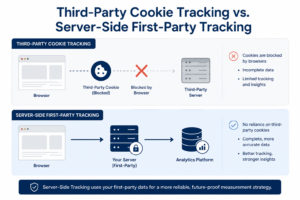
Unfortunately, there is no one replacement for all of the third-party cookies. The new ways to keep track of conversion utilize a combination of different methods, mainly three or two of these ways together:
Method 1 — Google Analytics 4 (GA4) with First-Party Cookies
GA4 places its cookies on your own site, as opposed to cross-site. This makes GA4 the first source when it comes to when we track conversions in a privacy driven environment. While the Safari 7 Day limit affects the amount of time that GA4 can track an individual with its first-party cookies and GA4 needs to be coupled with Consent Mode v2, GA4 can plan out and track conversions made by users that do not consent to tracking using machine learning.
- Implement your main GA4 conversion events (to track purchases, form submissions, phone clicks, and bookings).
- Have a compliant cookie banner that utilizes consent mode v2 to allow GA4 to plan out and track conversions from users that do not consent.
- Difficulty: Low | Cost: Free | Accuracy: Medium-High utilizing consent mode.
Method 2 — Server-Side Tagging (sGTM)
With Server-side Google Tag Manager, your tracking will be housed on your server rather than a user’s browser. Therefore, with respect to advertising cookie legislation, you will avoid having restrictions applied to tracking with sGTM. Your can track conversions with the use of sGTM will be greater than detection via any web browser method. Your overall accuracy will improve significantly.
- First, your server receives the data and forwards it on to Google, Meta and other platforms; they have bypassed the restrictions imposed by the browser.
- The page load time has been sped up because client-side tags no longer fire in the browser upon page load.
- Difficulty: Medium-High | Cost: ~$25-100/mo for server hosting | Accuracy: Very High
Method 3 — Meta Conversions API (CAPI)
Since a major portion of your audience is using Facebook or Instagram ads, the Meta Pixel has become less reliable for conversion tracking. The Meta Conversions API (CAPI) allows for quicker and more accurate reporting of conversion events to Meta as opposed to that of what’s occurring within the browser.
- Track conversions that would typically be missed by the Meta Pixel (CAPI would find around 20-30% more conversions when used alongside the Pixel in deduplication mode).
- Provides accurate conversion tracking results regardless of the user’s browser settings, iOS’ App Tracking Transparency (ATT) or their use of ad blockers.
- Difficulty: Medium | Cost: Free (Developer Setup Time) | Accuracy: High
Method 4 — UTM Parameter Tracking
UTM parameters are tracking tags that you attach to URLs; they do not require any cookies to work. They embed tracking information for each user visit directly into the URL & GA4 will recognize them when the user accesses your website.
- Functions in any browser without relying on cookies.
- Most useful when tracking email marketing, social media links, and landing pages where it’s sufficient to use ‘session-based’ attribution for a conversion.
- Limitation: You can only track conversions within one session (i.e., you cannot track a single customer’s conversion across multiple sessions or devices).
Method 5 — First-Party CRM Data and Customer Match
The best way to track conversions rates long-term would be through the use of first-party data collected from your bookings or CRM systems that are owned by you. So, if a customer gives you their email address at the time of booking/purchase, this information can then be used to associate that conversion with the ad they originally clicked on without relying on cookies to do it.
- You can now match Google Ads customer data and enhanced conversions by uploading a customer’s hashed email address to associate the conversion on their logged-in Google account.
- Many companies in Salem OR that provide service-based appointments using a booking system (such as Calendly, Acuity, or their own CRM) are already collecting this first-party data and are not utilizing it for attribution to the ad that drove the conversion.
- Level of difficulty: Average | Cost: Free if you already have a CRM | Accuracy: High
Method 6 — Google Enhanced Conversions
Enhanced Conversions provides Google with hashed customer data (such as an email or phone number) with standard conversion events so that Google associates this with a logged-in account and track conversions when they are not able to do so due to the absence of any data collected.
Email hashing (SHA-256) occurs as the data is sent via either Google Ads or server-side tags.
This method is thought to retrieve up to 30% more conversions than traditional tracking methods, especially for users of Safari and iOS devices.
Difficulty: low to medium; cost: none; increase in accuracy: 15 to 30%.
Comparison — Ways to Track Conversions Without Cookies
| Method | Difficulty | Cookie Dependency | Accuracy | Best For |
| GA4 + Consent Mode | Low | None (first-party) | Medium–High | All websites — baseline required |
| Server-Side Tagging (sGTM) | Medium–High | None (server-side) | Very High | eCommerce, high-value advertisers |
| Meta Conversions API | Medium | None (server-side) | High | Facebook and Instagram advertisers |
| UTM Parameters | Low | None | Medium (session only) | Email, social, paid ads |
| First-Party CRM Data | Medium | None | High | Service businesses, lead gen |
| Enhanced Conversions | Low–Medium | Minimal (email hash) | High (+15–30%) | Google Ads campaigns |
📈 Chart note: Bar graph example showing comparison of setup difficulties and accurate results for each method to provide a visual of selection criteria. Difficulty Level associated with X-axis and method associated with Y-axis. This method aids the user to determine which method to use that is in accordance with their technical skills.
Step-by-Step: GA4 Conversion Tracking Setup Without Cookies
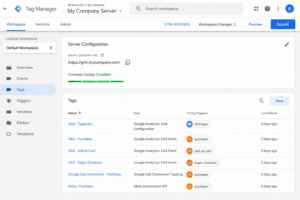
GA4 is the preferred method for all businesses to track conversions in a cookieless world. Follow the instructions below to create a valid account.
- Create an GA4 Property in Google Analytics. Set the GA4 Property with your website data stream.
- Use GTM to implement GA4 tag for measurement. You may choose to use either a client or server-based container, but you should always use the server-based method for accuracy.
- Use Google Consent Mode V2 after using a compliant cookie consent banner, which will allow GA4 to use proper consent signals prior to firing.
- Turn on Enhanced Measurement. This auto-tracks page views, scroll depth, outbound link clicks, file downloads, and video plays.
- Identify the conversion activities within your Google Analytics account (GA4) and in the admin section mark the following events as conversions: purchase; form submission; phone click; appointment booked.
- Turn on the Enhanced Measurement feature within Google Analytics to automatically track all page views, scrolling depth, clicks on external links, file downloads, and video views.
- Link Google Analytics to your Google Ads account so that you can import all GA4 conversion activities for smart bidding and accurate reporting on Google Ads campaigns.
- Test all of your work using both the GA4 Realtime View (in GA4) and the Google Tag Assistant Chrome browser extension before launching any marketing campaigns on your website.
Conclusion
Track conversions provides the ability to measure overall marketing performance and make wise advertising decisions based on these metrics. With the deprecation of third-party cookies, being able to implement modern marketing solutions like GA4, Consent Mode v2, Enhanced Conversions, and server-side tracking will provide you with dependable alternatives when done correctly.
If your business is currently advertising using Google Ads or Meta Ads, start by setting up GA4 properly and using Consent Mode v2. Then as your tracking needs grow, you can implement Enhanced Conversions and server-side tagging. The earlier you implement these tools, the better and more accurate your conversion data will be enabling you to optimize your campaigns confidently. Want to upgrade your conversion tracking? Contact us today to help setup GA4, Enhanced Conversions, & server-side tracking for precise, privacy-conscious analytics.
Frequently Asked Questions
Q: How can I track conversions without third-party cookies?
A: Using GA4, server-side Google Tag Manager, the Meta Conversions API, Google Enhanced Conversions, and UTM parameters can all help to accurately track conversions. By using combinations of these tracking methods across most web browsers, you should have some confidence in the accuracy of your conversion tracking.
Q: What replaces third-party cookies in 2026?
A: First-party cookies, server-side tracking, and GA4 Consent Mode will all be used as the sole options for accurately track conversions from 2026 and afterwards. Additionally businesses will be able to leverage Google Privacy Sandbox and the Meta Conversions API as methods for measuring conversions in the future as well.
Q: Is Google Analytics accurate without third-party cookies?
A: Yes, even without third-party cookies the GA4 platform is able to provide accurate measurements of visits; however, some of your data will likely be impacted by the use of ad blockers or browser privacy functions and/or the users consent settings for browsers. You can also increase the accuracy of your measurements by pairing GA4 with server-side tracking.
Q: How do I set up server-side conversion tracking?
A: You can set up server-side conversion tracking by creating a Google Tag Manager container for your server (as opposed to browser) environment, connecting your container to the custom tracking domain, deploying your tracking tags to your container, and routing all tracking data through your server before it’s sent to your analytics or advertising platform(s).