

AI for Web Developers: Tools to Build Faster in 2026

Introduction
AI for web developers means using artificial intelligence tools — code generation, design assistance, automated testing, and natural language interfaces — to write better code faster and reduce repetitive work. In 2026, AI for web developers has moved from a curiosity to a core part of professional practice. Developers who use these tools well work faster, make fewer errors, and deliver more for their clients.
Whether you are a freelance developer in Salem, Oregon or part of a growing tech team in the Willamette Valley, the pressure to build faster, deliver more, and charge competitive rates has never been higher. AI for web developers is one of the most practical answers to that pressure. This guide covers the best tools available in 2026, what each one does well, and how to use them without falling into the common traps.
A 2024 GitHub survey found that 92% of US developers already use AI coding tools at work. Those using GitHub Copilot report up to 55% faster task completion on routine coding work. The productivity gap between developers who use AI for web developers and those who do not is widening every month.
Why AI for Web Developers Is No Longer Optional in 2026
📊 Stat: 92% of US developers use AI coding tools at work. GitHub Copilot users complete tasks up to 55% faster on average. (Source: GitHub Octoverse Report 2024)
The reason AI for web developers has become so important is simple: clients and employers expect more, faster, and at a lower cost. AI tools do not replace developer judgment — they remove the boring, repetitive parts of the job so you can focus on the work that actually needs a human brain.
- AI for web developers compresses hours of boilerplate writing into minutes. Writing CRUD operations, API integrations, and standard React components no longer takes half a day.
- Salem, Oregon’s tech and startup scene is growing. Local agencies and freelancers compete with remote developers worldwide — AI for web developers is one of the most accessible ways to stay competitive.
- Non-developers — designers, marketers, founders — are increasingly using AI tools to build simple websites and prototypes. Professional AI for web developers usage needs to go deeper than what non-coders can do.
- Debugging, documentation, and code review — three tasks that eat developer time — are all dramatically faster with AI assistance.
Top AI for Web Developers Tools in 2026 — Master Comparison
Here are the eight tools that serious developers are using right now, and what each one is actually best at:
| AI Tool | Category | Best For | Free Plan? | 2026 Standout Feature |
| GitHub Copilot | Code generation | Inline autocomplete in VS Code, JetBrains, IntelliJ | No — from $10/mo | Multi-file context — suggests code across your whole repo |
| ChatGPT / GPT-4o | Code + debugging | Architecture planning, SQL, regex, code review | Yes (limited) | Custom GPTs for project-specific coding workflows |
| Cursor IDE | AI-native IDE | Full codebase AI — ‘chat with your code’ | Yes (limited) | Composer mode — writes multi-file features from a single prompt |
| v0 by Vercel | UI generation | React and Tailwind components from text description | Yes (limited) | Instant React component from plain English — no code needed |
| Tabnine | Code completion | Privacy-first, on-premise AI suggestions | Yes | Self-hosted enterprise version — no data leaves your org |
| Codeium | Code completion | Fast autocomplete across 70+ languages | Yes — fully free | Best zero-cost alternative to Copilot for freelancers |
| Jasper AI | Content writing | Web page copy, landing pages, blog posts | No — from $49/mo | Brand voice training for consistent content at scale |
| Playwright + AI | Testing | Auto-generating end-to-end tests from plain English | Open source | AI generates full test scripts from natural language descriptions |
AI for Web Developers by Use Case
Different AI tools shine in different parts of the development workflow. Here is how AI for web developers fits across the four most common tasks:
Code Generation and Autocompletion
This is where most developers first experience AI for web developers in action. Tools like GitHub Copilot and Cursor IDE watch what you are writing and suggest complete functions, entire components, and even multi-file implementations — based on a comment or partial code stub.
- Copilot and Cursor complete entire functions from a single comment line — useful for anything from sorting algorithms to API handlers.
- Boilerplate code that used to take 30–60 minutes now takes 5–10 minutes with AI assistance. That compounds quickly across a full project.
- AI for web developers tools now suggest context-aware code across multiple files simultaneously — not just the file you have open.
UI Design and Front-End Prototyping
UI prototyping is one of the most time-consuming parts of front-end development. AI for web developers tools like v0 by Vercel and Figma AI are changing that fast.
- v0 converts a plain text description into a production-ready React and Tailwind component in seconds. Salem-based developers can show clients a working prototype the same day they receive a brief.
- Figma AI (2025/2026 updates) auto-generates design components and annotates developer handoff specs automatically.
- Prototyping time for standard UI patterns — dashboards, landing pages, form pages — has dropped by 60–80% for developers actively using AI for web developers tools.
Debugging and Code Review
Debugging is where many developers lose hours chasing a problem they cannot quite see. AI for web developers assistants — particularly ChatGPT and Claude — are surprisingly good at explaining errors in plain English and suggesting fixes.
- Paste an error message and the relevant code into ChatGPT or Claude. Most common debugging problems are solved in one or two exchanges.
- AI-powered linting tools like DeepSource and SonarQube with AI automatically flag security issues, code smells, and quality problems before they reach production.
Automated Testing
Writing test scripts is important but tedious. AI for web developers tools are making automated testing much easier to adopt.
- Playwright’s AI mode generates end-to-end test scripts from plain English descriptions of expected user behaviour — no manual scripting required.
- Manual test-writing time drops by 50–70% on typical web applications when AI for web developers testing tools are used consistently.
Real Productivity Impact — What the Data Shows
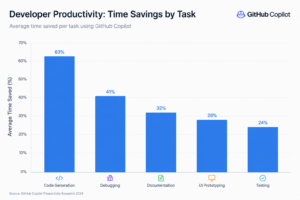
Here is what AI for web developers tools save on common development tasks, based on composite data from GitHub, Stack Overflow, and JetBrains developer surveys:
| Task | Without AI Tools | With AI Tools | Time Saved |
| Writing boilerplate code | 3–4 hours | 45–60 minutes | ~70% |
| Debugging an unfamiliar error | 2–3 hours | 20–40 minutes | ~65% |
| Writing technical documentation | 2 hours | 20–30 minutes | ~75% |
| Generating UI components | 4–6 hours | 30–60 minutes | ~80% |
| Writing E2E test scripts | 3 hours | 1 hour | ~67% |
📈 Chart note: A horizontal bar chart comparing ‘Without AI’ vs ‘With AI’ hours across these five task categories makes this data easy to communicate to clients or team leads. Plot time saved (0–80%) on the X axis.
Limitations and Honest Trade-Offs
AI for web developers is genuinely useful — but it is not perfect. Being honest about the limitations is part of using these tools effectively:
- AI generates plausible code that can be wrong. Always review and test any AI-generated output before it goes anywhere near production.
- Security vulnerabilities can appear in AI-generated code if suggestions are accepted without review. AI for web developers tools do not automatically write secure code.
- Large codebases exceed the context window of most AI tools. Without extra tooling like Cursor’s codebase indexing, the AI loses track of your project structure.
- AI for web developers means using artificial intelligence tools — code generation, design assistance, automated testing, and natural language interfaces — to write better code faster and reduce repetitive work. In 2026, AI for web developers has moved from a curiosity to a core part of professional practice. Developers who use these tools well work faster, make fewer errors, and deliver more for their clients.Whether you are a freelance developer in Salem, Oregon or part of a growing tech team in the Willamette Valley, the pressure to build faster, deliver more, and charge competitive rates has never been higher. AI for web developers is one of the most practical answers to that pressure. This guide covers the best tools available in 2026, what each one does well, and how to use them without falling into the common traps.
A 2024 GitHub survey found that 92% of US developers already use AI coding tools at work. Those using GitHub Copilot report up to 55% faster task completion on routine coding work. The productivity gap between developers who use AI for web developers and those who do not is widening every month.
Why AI for Web Developers Is No Longer Optional in 2026
📊 Stat: 92% of US developers use AI coding tools at work. GitHub Copilot users complete tasks up to 55% faster on average. (Source: GitHub Octoverse Report 2024)
The reason AI for web developers has become so important is simple: clients and employers expect more, faster, and at a lower cost. AI tools do not replace developer judgment — they remove the boring, repetitive parts of the job so you can focus on the work that actually needs a human brain.
- AI for web developers compresses hours of boilerplate writing into minutes. Writing CRUD operations, API integrations, and standard React components no longer takes half a day.
- Salem, Oregon’s tech and startup scene is growing. Local agencies and freelancers compete with remote developers worldwide — AI for web developers is one of the most accessible ways to stay competitive.
- Non-developers — designers, marketers, founders — are increasingly using AI tools to build simple websites and prototypes. Professional AI for web developers usage needs to go deeper than what non-coders can do.
- Debugging, documentation, and code review — three tasks that eat developer time — are all dramatically faster with AI assistance.
Top AI for Web Developers Tools in 2026 — Master Comparison
Here are the eight tools that serious developers are using right now, and what each one is actually best at:
AI Tool Category Best For Free Plan? 2026 Standout Feature GitHub Copilot Code generation Inline autocomplete in VS Code, JetBrains, IntelliJ No — from $10/mo Multi-file context — suggests code across your whole repo ChatGPT / GPT-4o Code + debugging Architecture planning, SQL, regex, code review Yes (limited) Custom GPTs for project-specific coding workflows Cursor IDE AI-native IDE Full codebase AI — ‘chat with your code’ Yes (limited) Composer mode — writes multi-file features from a single prompt v0 by Vercel UI generation React and Tailwind components from text description Yes (limited) Instant React component from plain English — no code needed Tabnine Code completion Privacy-first, on-premise AI suggestions Yes Self-hosted enterprise version — no data leaves your org Codeium Code completion Fast autocomplete across 70+ languages Yes — fully free Best zero-cost alternative to Copilot for freelancers Jasper AI Content writing Web page copy, landing pages, blog posts No — from $49/mo Brand voice training for consistent content at scale Playwright + AI Testing Auto-generating end-to-end tests from plain English Open source AI generates full test scripts from natural language descriptions AI for Web Developers by Use Case
Different AI tools shine in different parts of the development workflow. Here is how AI for web developers fits across the four most common tasks:
Code Generation and Autocompletion
This is where most developers first experience AI for web developers in action. Tools like GitHub Copilot and Cursor IDE watch what you are writing and suggest complete functions, entire components, and even multi-file implementations—based on a comment or partial code stub.
- Copilot and Cursor complete entire functions from a single comment line — useful for anything from sorting algorithms to API handlers.
- Boilerplate code that used to take 30–60 minutes now takes 5–10 minutes with AI assistance. That compounds quickly across a full project.
- AI for web developers tools now suggest context-aware code across multiple files simultaneously — not just the file you have open.
UI Design and Front-End Prototyping
UI prototyping is one of the most time-consuming parts of front-end development. AI for web developers tools like v0 by Vercel and Figma AI are changing that fast.
- v0 converts a plain text description into a production-ready React and Tailwind component in seconds. Salem-based developers can show clients a working prototype the same day they receive a brief.
- Figma AI (2025/2026 updates) auto-generates design components and annotates developer handoff specs automatically.
- Prototyping time for standard UI patterns — dashboards, landing pages, form pages — has dropped by 60–80% for developers actively using AI for web developers tools.
Debugging and Code Review
Debugging is where many developers lose hours chasing a problem they cannot quite see. AI for web developers assistants — particularly ChatGPT and Claude — are surprisingly good at explaining errors in plain English and suggesting fixes.
- Paste an error message and the relevant code into ChatGPT or Claude. Most common debugging problems are solved in one or two exchanges.
- AI-powered linting tools like DeepSource and SonarQube with AI automatically flag security issues, code smells, and quality problems before they reach production.
Automated Testing
Writing test scripts is important but tedious. AI for web developer tools are making automated testing much easier to adopt.
- Playwright’s AI mode generates end-to-end test scripts from plain English descriptions of expected user behavior—no manual scripting required.
- Manual test-writing time drops by 50–70% on typical web applications when AI for web developers’ testing tools are used consistently.
Real Productivity Impact — What the Data Shows
Here is what AI for web developers tools save on common development tasks, based on composite data from GitHub, Stack Overflow, and JetBrains developer surveys:
Task Without AI Tools With AI Tools Time Saved Writing boilerplate code 3–4 hours 45–60 minutes ~70% Debugging an unfamiliar error 2–3 hours 20–40 minutes ~65% Writing technical documentation 2 hours 20–30 minutes ~75% Generating UI components 4–6 hours 30–60 minutes ~80% Writing E2E test scripts 3 hours 1 hour ~67% 📈 Chart note: A horizontal bar chart comparing ‘Without AI’ vs. ‘With AI’ hours across these five task categories makes this data easy to communicate to clients or team leads. Plot time saved (0–80%) on the X axis.
Limitations and Honest Trade-Offs
AI for web developers is genuinely useful—but it is not perfect. Being honest about the limitations is part of using these tools effectively:
- AI generates plausible code that can be wrong. Always review and test any AI-generated output before it goes anywhere near production.
- Security vulnerabilities can appear in AI-generated code if suggestions are accepted without review. AI for web developer tools does not automatically write secure code.
- Large codebases exceed the context window of most AI tools. Without extra tooling like Cursor’s codebase indexing, the AI loses track of your project structure.
- Tool subscriptions add up. Depending on what you use, expect to spend $10–$100 per developer per month. Factor this into project pricing.
- AI suggestions can reflect outdated patterns if the model’s training data predates recent framework updates. Always cross-check generated code against current documentation.
Frequently Asked Questions
Q: What AI tools do web developers use most in 2026?
A: Popular tools include GitHub Copilot, ChatGPT, Claude, Cursor IDE, and v0 by Vercel.
Q: Is AI replacing web developers in 2026?
A: No. AI boosts productivity, but developers are still needed for strategy, security, and problem-solving.
Q: How can AI speed up web development for small teams and freelancers?
A: AI helps automate coding, testing, documentation, and prototyping, saving significant time.
Q: What is the best free AI tool for web developers in 2026?
A: Codeium is a leading free coding assistant, while ChatGPT’s free tier is useful for coding and debugging tasks.
Conclusion
AI for web developers has become an essential part of modern web development, helping developers code faster, automate repetitive tasks, and improve productivity. Start with tools that fit your workflow and expand as needed. Ready to streamline your development process? Contact us to learn how we can help your team build faster and smarter.